NewSee when repeat customers will order next →
FreeInstall from the Shopify App Store

Reorder reminder app for ShopifyYour customers already chose you.
Bring them back for the next one.

Easy Reorder is a reorder reminder app for Shopify. It reminds customers when it’s time to buy again, lets them reorder in one click with no password, and shows you who is due next.

Install free on Shopify Try the live demo →

Free plan · Set up in minutes · Works with Klaviyo and your subscription app
Shopify admin › Apps › Easy Reorder
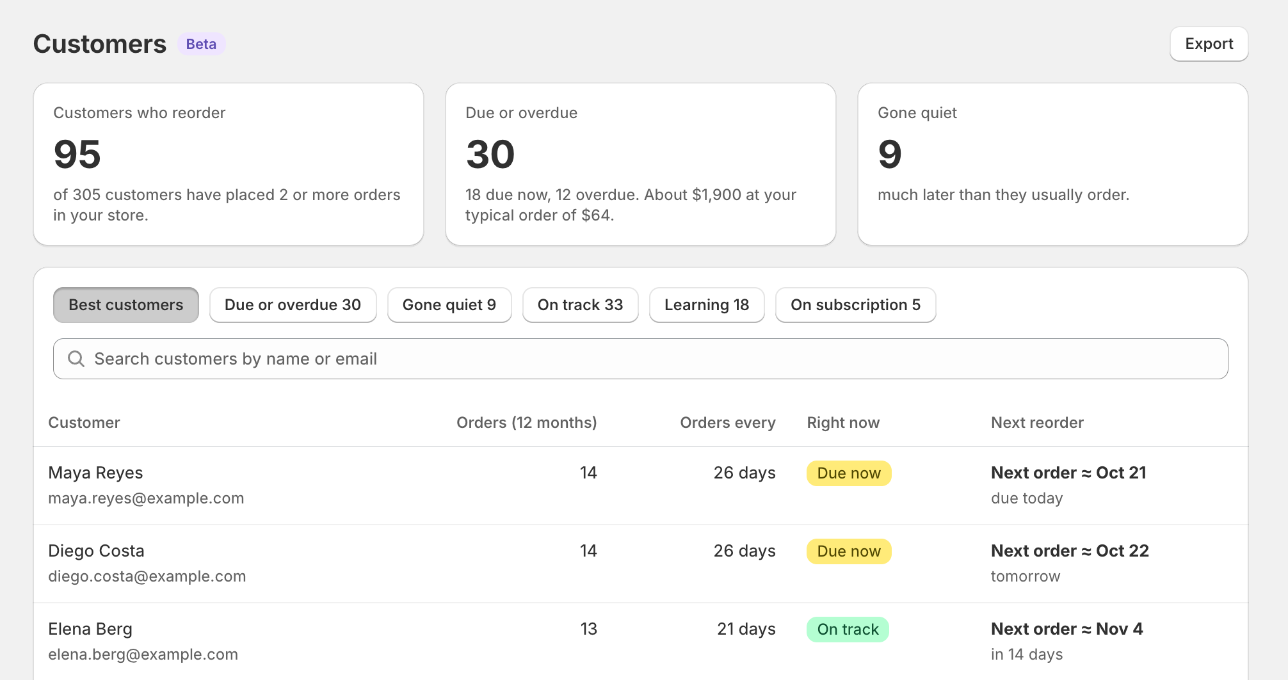
The Easy Reorder Customers page: every repeat customer with their status and next order date
Time to reorder Cold Brew Pods?
Reminder email · to Maya Reyes
Reorder nowSnooze 14 days
Reorder placed
Elena Berg · via floating button · 2 items
Works alongside the apps you already run Shopify Klaviyo Judge.me Recharge Appstle Loop Skio
THE REPEAT-ORDER LOOP

The second order shouldn’t depend on the customer remembering.

Easy Reorder handles the whole stretch between orders: it shows you each customer’s rhythm, reminds them on the schedule you set, and turns “I should buy that again” into one tap.

01 · See
Know who’s due next
Every repeat customer, with a next order date once their pattern is clear.
02 · Remind
Reach them on time
Reminder emails, or a date they pick themselves.
03 · Reorder
One tap to buy again
Three widgets put their last order back in front of them.
04 · Measure
See what came back
Every reorder traced to what brought it in.

See all features →

01 · Know who’s due nextBetaStarter and up

See which repeat customers will order next

Easy Reorder reads each customer’s own order history and gives you one date: when they’re likely to order again. No spreadsheets, no guessing from store-wide averages. The Free plan shows this for your top 3 customers.
Plain-word status for everyone. On track, Due now, Late, Gone quiet. Subscribers are set aside, and new customers show as Learning until their pattern is clear.
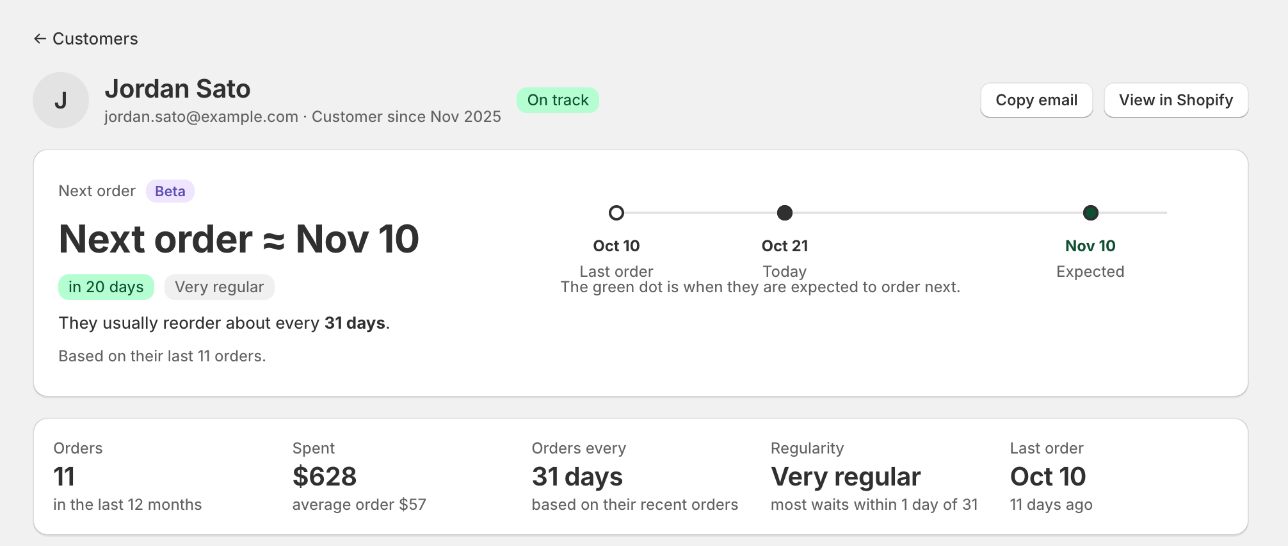
The full story on one page. Orders and reminder emails on one timeline, what they buy, and how they came back.
Take it anywhere. Export any list to CSV for your own outreach.
A customer page in Easy Reorder: next order date, how regular they are, and their order history
02 · Reach them on time

Reorder reminder emails that arrive before they run out

Tell Easy Reorder how long each product lasts. It emails customers who have opted in to marketing when theirs is about to run out, follows up if they don’t order, and stops the moment they do.
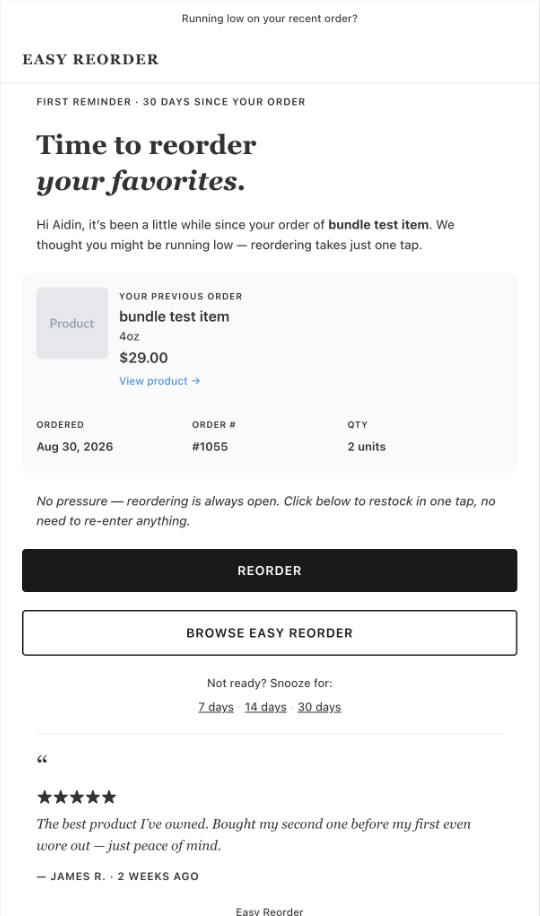
The reminder email, from the built-in editor
A reorder reminder email built in the Easy Reorder editor: the previous order, a Reorder button and snooze links
How reminders behave
Waits for stock. If the exact item they bought is sold out, the reminder waits for it to come back (up to 14 days).
Skips subscribers. Subscription orders are left to your subscription app, so subscribers don’t get a duplicate nudge.
Never too often. Items due close together go in one email, with a minimum gap between emails.
Follow-ups on your terms. Up to five emails per sequence, each sent a set number of days after the last if they haven’t ordered.
Snooze, not unsubscribe. Customers who aren’t ready can push their reminder back 7, 14 or 30 days with one click.
From your own domain. Add your sending domain so reminders come from your store’s address.
Timing per product. Set how long each product lasts, down to the variant, or keep one default for everything.
03 · One tap to buy againStarter and up

Three reorder widgets that put their last order back in front of them

Each one meets returning customers at a different moment: right after checkout, on the page they land on, and wherever they browse. Switch them on in Shopify’s theme or checkout editor. No code.
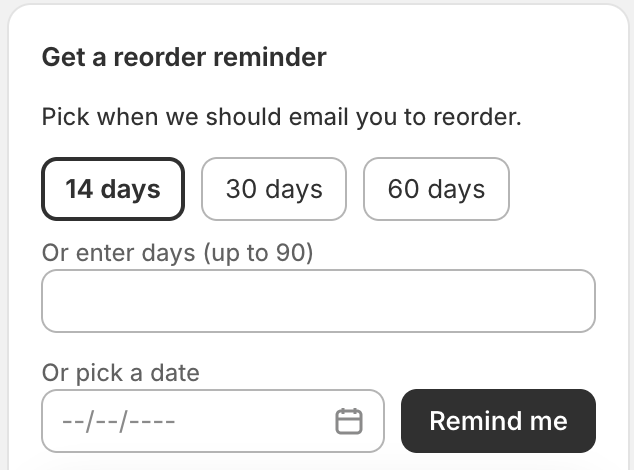
The reorder reminder picker on the Thank you page: 14, 30 or 60 days, or pick a date
After checkout
Reminder date picker
On the Thank you and Order status pages, customers choose when to hear from you: 14, 30 or 60 days (or choices you set), or a date of their own. Their reminder goes out that day.
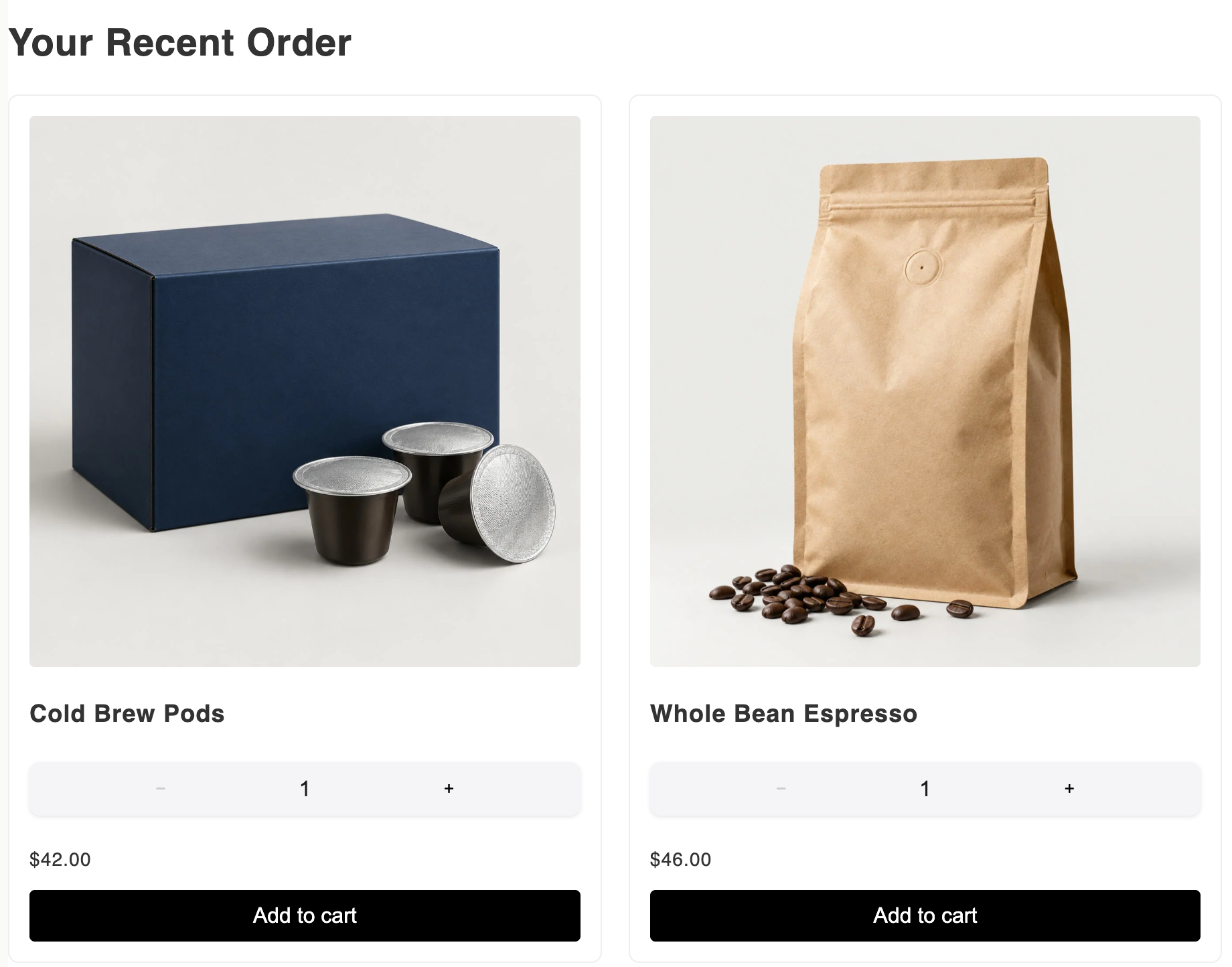
The recent order widget on a store home page: the customer's last order with Add to cart buttons
On your home or cart page
Recent order carousel
Returning customers see what they bought last time, with an Add to cart button on each item if you want it, right where they land. Grid or carousel, in your colors.
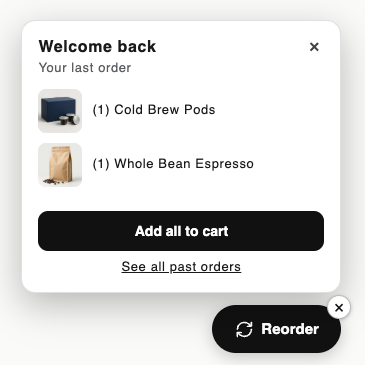
The floating reorder button opened: Welcome back, your last order, Add all to cart
Across your store
Floating reorder button
A small Reorder button that keeps their last order one tap away, with one button to add it all to the cart.
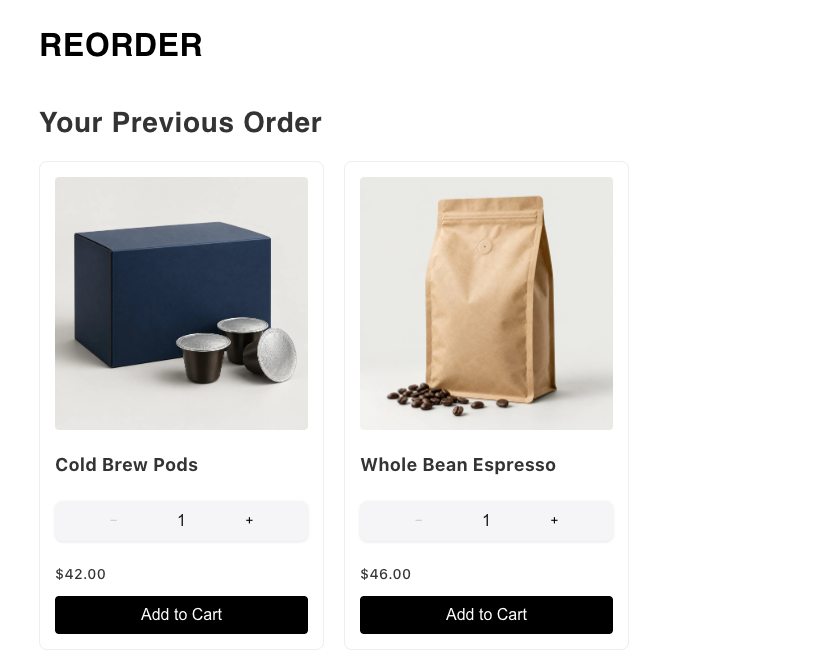
yourstore.com/a/easy-reorder
The Easy Reorder reorder page: the customer's previous order with Add to Cart buttons
Every way back leads to their own reorder page.

The carousel, the floating button and every reminder email open it: everything they’ve bought from you, ready to add to the cart, sizes and quantities included.

No password needed
After checkout, guests stay signed in for reorders on that device for 90 days. Elsewhere, email and zip code is enough.
A page that’s yours
Your colors, wording and layout, at the address you choose, or on any page of your theme.
A link for every customer
Each customer’s personal reorder link, for your emails, SMS, Klaviyo flows and Shopify admin.
04 · See what came backStarter and up

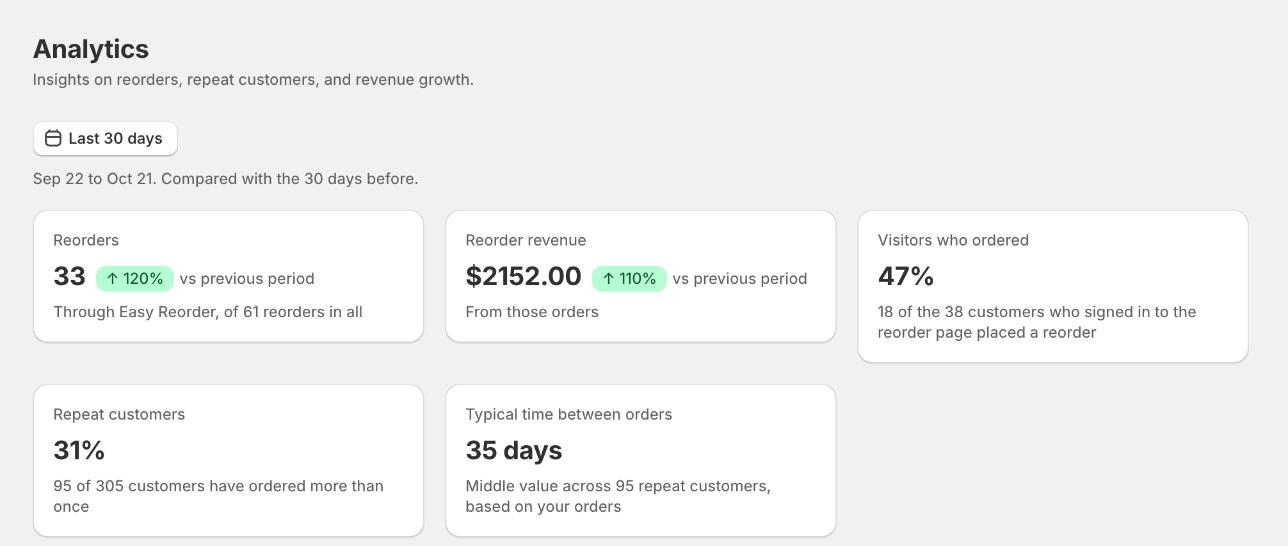
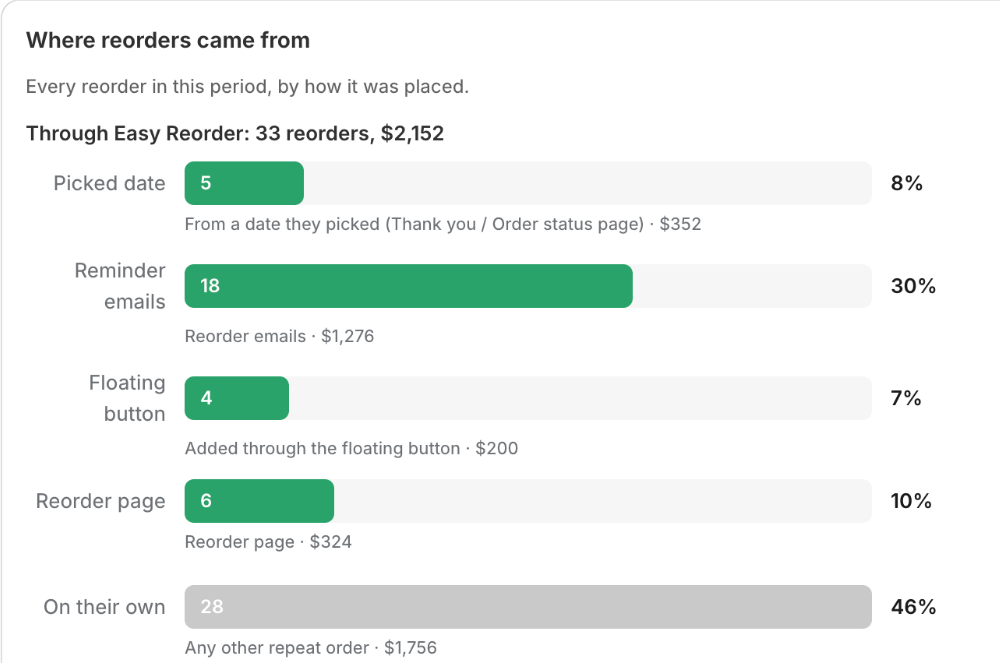
Reorder analytics: see where every reorder came from

Every repeat order is traced to what brought it in: a reminder email, a date the customer picked, the reorder page, or the floating button. Orders that came on their own are counted separately, so the numbers stay honest.
A weekly recap in your inbox
Every Monday morning, on every plan: what came back last week, your most reordered products, and quick wins to try next.
Easy Reorder Analytics: reorders and reorder revenue against the previous period Where reorders came from: picked date, reminder emails, floating button, reorder page, and on their own
INTEGRATIONS

Works with Klaviyo, Judge.me and your subscription app

Easy Reorder works inside Shopify and alongside the apps you already use, so there’s nothing new for your team to learn.

Shopify
Built in
Lives in your Shopify admin. Widgets go in with the theme and checkout editors, and every customer page in Shopify gets an Easy Reorder link to copy.
Klaviyo
Connect with an API key · Starter and up
Each customer’s reorder link is added to their Klaviyo profile, so any flow or campaign can send them straight to their reorder page.
Judge.me
Nothing to connect · Starter and up
Your product star ratings show on the reorder page and the recent order carousel, styled like your Judge.me badge.
Subscription apps
Recharge, Appstle, Loop, Skio
Subscription orders are left to your subscription app. Recharge and Appstle are detected automatically; others work with a customer tag.
Something else?
Tell us what you use
Request an integration from inside the app and tell us which tool you’d like Easy Reorder to work with next.

Everything a growing store needs. Nothing you have to babysit.

Set it up once. It keeps working while you run the rest of the business.

Looks like your store
Your colors, wording and products per row, plus custom CSS if you want full control.
Export any list
Download any customer list as a spreadsheet for your own outreach.
Product swaps
Discontinued a product? Customers see its replacement instead.
Your own email editor
Build each email from blocks: product cards, coupon codes, images and your logo.
Send from your domain
Add your own sending domain so reminders come from your store’s address.
Leave anyone out
Tag VIPs, wholesale accounts or products, and they’re skipped.
Found on Google, if you want
Choose whether your reorder page shows in search, with your own title and description.
Respectful by design
One-click unsubscribe in every email, and customer data deleted when they ask.
HOW IT WORKS

Set up the reorder reminder app in three steps

1
Switch it on in your theme
One toggle in the theme editor puts your reorder page live.
2
Turn on reorder emails
Start from a ready-made email and send yourself a test first.
3
Share your reorder link
Add it to your menu, newsletters and texts. Customers take it from there.

See the full walkthrough →

★★★★★
“Easy Reorder has really helped us get our customers to reorder. Adding magic links to our email flow was easy and we’ve seen great success with it.”
FindPetOwner.com · Shopify merchant

Questions about Easy Reorder

Something else? Visit the help center or write to [email protected].

Do my customers need an account or a password?

No. Reminder emails sign them straight in, guests stay signed in on the device they ordered from, and anyone else can find their orders with their email and zip code.

Will it clash with my subscription app?

No. Subscription orders are recognized and skipped, so subscribers only hear from your subscription app. Recharge and Appstle are detected automatically; other apps work through a customer tag.

Will customers get too many emails?

You set the minimum gap between emails, items due around the same time arrive in one message, and every email has one-click unsubscribe, plus snooze links by default.

Does it work with Klaviyo?

Yes, on Starter and up. Connect with a private API key and each customer’s reorder link is added to their Klaviyo profile, so any flow or campaign can send them straight to their reorder page.

What does it cost?

There’s a free plan, and paid plans from $9 a month with a 30-day free trial. See pricing.

Turn this month’s customers into next month’s orders.

Install free, switch it on in your theme, and send yourself the first reminder today.

Install free on Shopify See pricing